
Post-Secondary Application Information
Application Help
School counselors are available to help with applications during the advertised help sessions, seniors lunch, or during a senior’s modified period
Use the Senior Year Checklist to make sure you meet all deadlines
Application Steps
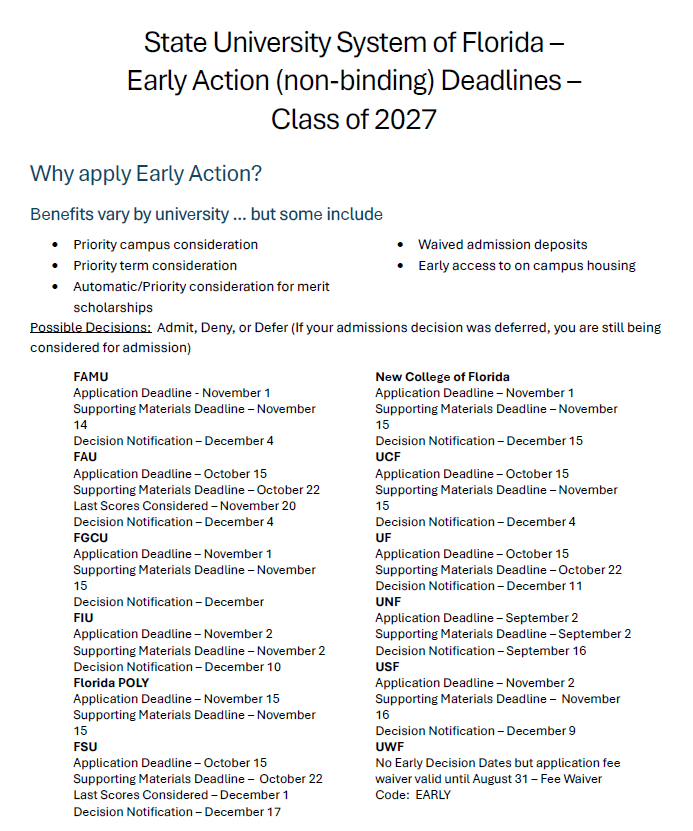
Step 1 – Know the deadlines and meet them; vary by college, look on their websites
Step 2 – Create a list of extracurricular activities, academic honors and achievements
Step 3 – Complete essay (if required)
Step 4 – Complete Application (either on university website or CommonApp, not both)
Step 5 – Send ACT/SAT/CLT scores to the university directly from those testing organizations
Step 6 – Pay application fee
Step 7 – Send transcripts via Parchment or submit self-reported academic record (depends on university)
Step 8 – Check in university portal to make sure they have everything they need; university portal is also where decisions are released
When to Apply?
- 4 Year College and/or University
- By Early Action deadline of senior year
- Even if the final deadline is in May or the college is on a ‘rolling admission’, we suggest applying by Early Action for priority access to scholarships, housing, etc.
- Seniors are applying with the cumulative GPA from the end of junior year, ACT and SAT test scores obtained by September/early October of senior year, and strength of the senior schedule
- 2 Year College/Trade/Technical/Vocational School
- Spring of Senior Year
- FSCJ and SJRSC will be on campus in March for FREE application days. Wait until those schools are on our campus to apply
- Military
- Start speaking with recruiters early in the year
- Take the ASVAB
What do you need before you start the application process?
- Look at the websites of all the colleges you are applying to and make a list of the following:
- Application deadlines
- Application fees
- Admission essay requirement and topic
- Letter of recommendation requirement
- Current academic history (you can view this in HAC on the transcript tab)
- Review transcript for accuracy – via Parchment
- ACT, SAT, and/or CLT score reports (send score reports directly from your ACT or SAT or CLT account)
- List of extracurricular activities (inside and outside of school); put the best stuff first
- Academic honors and achievements
- Information about you and your parent(s)/guardian(s)
- Social Security Number
- Parent information: occupation, employment status, income, level of education (which colleges they attended and how many degrees they have earned)
Applications
- Two ways to apply to colleges:
- Common App OR
- Application on the colleges website
- Submit the application and all other requirements by the schools published deadline – these deadlines are firm!
- Have your academic history, extracurricular activities, essays, and ACT/SAT/CLT score reports with you while filling out the application
- Break down the application process in small chunks – you don’t have to do it all in one day!
ACT, SAT, and CLT Official Score Reports
ACT – www.actstudent.org
SAT – www.collegeboard.org
CLT – https://www.cltexam.com/tests/clt/
Log in to student account and send your scores to the college(s) of your choice
Essays
- Colleges can either make the essay optional or required
- You can view specific essay requirements on the college’s admissions page
- Authentic story
- Excellent written skill
- No spelling or grammatical errors
- Essay is organized and has a purpose
- Essay answers the prompt
- Always type the essay outside of the application portal first
- Proofread the essay before submitting to the application portal
High School Transcript
- Official record of academic performance and testing history
- Different than a credit detail report that a counselor can print for you
- Transcripts for private and/or out of state schools should be requested via Parchment
- If applying via CommonApp, transcripts for private and/or out of state schools will be uploaded by the counselor
- All seniors are required to send a final transcript to the post-secondary institution they are attending in May via Parchment
Student Self-reported Transcript and Academic Record System (STARS)
- All public universities in Florida require STARS instead of official transcripts during the application process except for FGCU and FIU. UCF uses SPARK
- We recommend using the transcript screen in HAC or requesting a copy of your transcript via Parchment to assist in completing your self-report.
- Submit the STARS/SPARK after you submitted your application but by the deadline published by the university
- Pro tip – open two tabs in your web browser and copy and paste from HAC to STARS
- Entering Courses & Grades
- You must self-report ALL high school credit grades and courses on transcript, even classes that have been retaken for credit recovery or completed over the summer or taken in middle school
- Grade level taken – look at the school year in HAC/Transcript
- Name of course: list it exactly as is in HAC/Transcript (if the course is called a different name than what is in HAC, enter what it is called in parenthesis)
- Indicate if the course is standard, honors, AP, AICE, or dual enrollment
- Enter semester 1 grade and semester 2 grade
- Yearlong courses: Enter the same grade for semester 1 and 2
- List all grades exactly as they are listed on your transcript (we do not give + or – grades)
- Current 12th grade courses: in progress
- STARS Frequently Asked Questions
- State University Self Reporting Links – STARS (Self-Reported Transcript and Academic Record)
- FAMU
- FAU
- FloridaPoly
- FSU
- New College
- UCF (uses SPARK, not STARS)
- UF
- UNF
- USF
- UWF
Letters of Recommendation
- Everyone will have to provide a transcript or STARS, but not necessarily a letter of recommendation
- Check to see if letter of recommendation is required. If it isn’t required, don’t ask.
- Who should you ask to write a letter? Ask an adult in your life, who is not related to you, who knows you really well and would say really nice things about you!
- Give them a resume or brag sheet of your achievements to help them
- Ask well in advance of the deadline – bare minimum 2 weeks
- If using CommonApp, you will add the recommender name and email address in the portal
Decisions – Check your email & university portal
- Most colleges and universities send decision letters, including any scholarships that are awarded, electronically.
- Depending on the college that could look like …
- Log into your application portal for all decisions, including admission and scholarships
- Check your email for all decisions, including admission and scholarships
- Admit: A student that has been formally approved and acknowledged as having been granted admission to their academic programs.
- Waitlist: A group of students held in reserve after a college makes its admissions decisions. If openings occur, students on the waitlist may be offered admission.
- Deny: An admission outcome wherein a student was unable to be offered admission.
- Defer: An admission outcome wherein a student who has applied for early admission is not accepted or rejected, rather their application is reconsidered within the Regular Decision pool.
- Depending on the college that could look like …
We want to celebrate seniors
- As they are coming in, send Ms. Cashwell ALL acceptance and scholarship award letters! All of them, even if you aren’t planning to attend that school.
- Please remember that we want vocational and military information as well.
- Ways you can turn all your acceptance letters and scholarship offers to Ms. Cashwell:
- Email PDF of all acceptance letters and scholarship offers from your online portal to Ms. Cashwell or
- Make a copy of the acceptance letters and scholarship offers and drop them by the AICE office on the 3rd
Resources
- State University System Guide/Matrix – https://issuu.com/fiupublications/docs/final_sus_matrix_2026
- College Score Card – https://collegescorecard.ed.gov/
- Presentations – https://www-bhs.stjohns.k12.fl.us/guidance/presentations-and-resources/
- Transcript Requests – https://www-bhs.stjohns.k12.fl.us/guidance/transcript-requests/